
Grant Tracking in Salesforce: The Single Opportunity + Payment Schedule Model
A practical guide to tracking multi-year grants in Salesforce — addressing the exact challenges of reporting on applied vs. awarded vs. received, while staying future-proof for accounting integrations.
In response to a community discussion on grant tracking approaches for multi-year grants
The Challenge
The Common Dilemma
You apply for a $100K grant, get awarded the full amount, but it's paid out over 4 years. Do you create one Opportunity or four? Each approach has trade-offs around reporting accuracy, data hygiene, and future integrations with accounting systems like QuickBooks.
✗ Multiple Opportunities Per Grant
- • Hard to report on total awarded amount
- • "Applied grants" vs "awarded" gets muddled
- • Pipeline reporting inflated or confusing
- • Difficult to see full grant lifecycle at a glance
- • Accounting sync becomes fragmented
✓ Single Opportunity + Payment Schedules
- • One source of truth per grant
- • Clean applied → awarded → received pipeline
- • Installments tracked via Payment Schedule
- • Easy roll-up reporting across fiscal years
- • Accounting-system ready from day one
Our Recommended Model
Based on our experience implementing Salesforce for nonprofits and grant-making organizations, we recommend the Single Opportunity + Payment Schedule approach.
1. One Opportunity = One Grant
Create a single Opportunity capturing the full awarded amount ($100K in the example). Use custom fields to track:
2. Payment Schedule for Installments
Use a Payment Schedule related list on the Opportunity to track each installment — whether quarterly, annual, or milestone-based. Each payment record captures the scheduled date, amount, invoice details, and collection status.
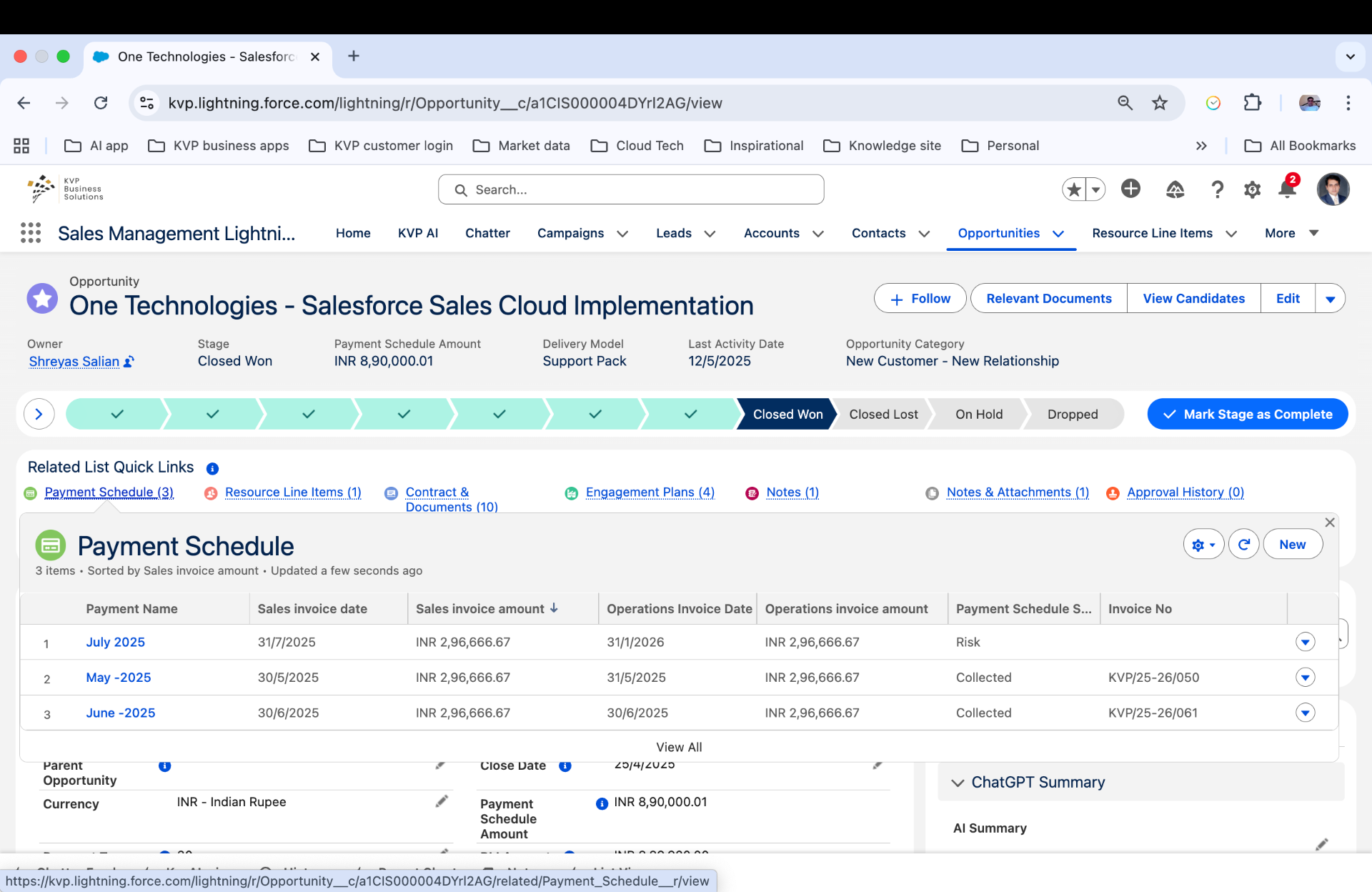
Example: Payment Schedule tracking 3 installments with sales invoice dates, operations invoice dates, amounts, and collection status (Collected / Risk).
3. Stage-Based Grant Lifecycle
Customize your Opportunity stages to reflect the grant lifecycle:
This gives you clean reporting: Applied (Application Submitted + Under Review) → Awarded (Awarded + Agreement Signed) → Received (track via Payment Schedule status).
Reporting & Accounting Readiness
Grant Pipeline Reports
- • Applied vs Awarded vs Received — filter by stage
- • Multi-year forecast — roll up Payment Schedule amounts by fiscal year
- • Funder analysis — grants by source, success rate
- • Cash flow projection — scheduled vs collected payments
QuickBooks / ERP Integration
- • Each Payment Schedule record maps to an invoice/receivable
- • Invoice Number field for cross-reference
- • Status field (Scheduled → Invoiced → Collected) drives sync triggers
- • Clean 1:1 mapping — no messy multi-Opportunity reconciliation
Dashboards & Visibility
- • Executive dashboard: total pipeline, awarded YTD, collected YTD
- • Program manager view: grants by program area, upcoming milestones
- • Finance view: receivables aging, cash forecast by quarter
- • Board reporting: year-over-year grant growth, funder diversification
Gotchas We've Learned
- • Don't split Opportunities by year — you lose the single grant view
- • Use record types if you track both grants received and grants given
- • Automate payment schedule creation — use Flow to generate installments from award amount + payment terms
- • Track restricted vs unrestricted — critical for GAAP compliance
Why KVP?
Salesforce implementations delivered
Nonprofit & grant management projects
Client satisfaction on nonprofit engagements
We've implemented grant tracking solutions for foundations, nonprofits, and social enterprises — including complex multi-year, multi-funder scenarios with accounting integrations. Our approach ensures your Salesforce instance is both operationally effective today and architecturally ready for future integrations.
We also offer a comprehensive Grant Management Requirements Checklist covering the entire grant lifecycle — from program planning and application intake through impact measurement and closeout.