
From government portal to bid decision with Agentforce
Turn relevant government tenders into Salesforce opportunities, explained bid/no-bid decisions and an owned proposal plan. Built with Agentforce; the existing build demonstrates procurement discovery, with each additional source and jurisdiction scoped separately.
Quick answer
Government Tender Intelligence is a KVP Salesforce asset built on Agentforce. It finds relevant tenders on public procurement portals, reads every page of the tender documents, scores feasibility across seven areas, gives a bid recommendation with reasons and gaps, and turns the decision into dated bid tasks, all on one Salesforce record. It is already running live in Salesforce for a construction and engineering customer.
Objective
Bid teams lose days opening portals, downloading PDFs and re-typing tender details before anyone can judge if a tender is worth pursuing. The objective is that every relevant tender is found, read, scored and turned into a bid plan before the team opens a single PDF, with people keeping the final decision.
Government tender management in Salesforce: from discovery to proposal
For manufacturers worldwide, engineering businesses and EPC bid teams, finding a public-sector opportunity is only the start. A tender may include technical specifications, eligibility conditions, earnest money, delivery milestones and multiple documents. Government Tender Intelligence connects this information to the sales process rather than leaving it scattered across a procurement portal, email attachments and spreadsheets. Salesforce becomes the working record for qualification, ownership, review and bid preparation.
The Agentforce workflow supports document extraction, an evidence-led bid/no-bid recommendation and coordinated follow-up. Bid managers can check the original tender, challenge an extracted field and assign work before committing resources. Proposal generation should use reviewed requirements and approved commercial inputs; the solution does not replace procurement expertise, legal review or the buyer's final evaluation.
Choose the right procurement intake for your market
Procurement marketplaces and tender publication portals serve different workflows. Some buyers use catalogue purchasing and bidding; others publish multi-document RFQs and RFPs through national, regional or sector-specific e-procurement platforms. A Salesforce tender management implementation needs to preserve the portal source and procurement identifier so reviewers can return to the authoritative notice and confirm deadlines, corrigenda and submission instructions.
KVP's existing build demonstrates procurement discovery on a scoped source. The same opportunity-management approach can be adapted to additional procurement sources, but access and coverage must be validated separately for each market. Portal permissions, authentication, CAPTCHA steps and supported document access determine the intake design. Automation must respect portal terms and access controls; a human-assisted download is preferable to bypassing a portal restriction.
AI bid/no-bid analysis for manufacturing and engineering teams
A useful tender qualification process tests more than keyword relevance. Manufacturing reviewers need to assess capacity, tooling, quality obligations, lead times and supply-chain readiness. Finance evaluates commercial terms and working-capital exposure; engineering checks technical fit; sales owns the opportunity and clarification process. The asset brings these reviews into a shared bid board, with weighted feasibility scores and reasons that can be checked against source documents.
Missing information should stay visible rather than become an invented AI answer. KVP recommends an approval gate for bid/no-bid, another for proposal content and a final review before portal submission. Measure extraction accuracy, time to qualification, task completion before deadline, proposal rework and eventual award outcomes separately. These are measurement targets, not claims of results already achieved.
Customer implementation: a construction and engineering bid workflow
The existing asset material describes a live Salesforce build for an anonymous construction and engineering customer. Its workflow brings tender discovery, extracted documents, feasibility analysis and assigned bid tasks into the same environment. The interface examples below show the operating process: search for relevant tenders, inspect the source, review an explained recommendation and coordinate preparation across departments.
This is an implementation example, not a verified tender-win case study. No award notice, attributable contract value or measured improvement in win rate is supplied in the available material. A real award story needs a confirmed tender outcome and approved supporting details before it can be presented as evidence of business impact.
KVP's recommended steps to get started with Agentforce tender automation
- Select the pilot scope. Agree on one portal, a set of buyer organisations and the product or project categories your team can deliver.
- Define the Salesforce records. Map tender identifiers, buyers, deadlines, source documents, opportunities, RFQs and ownership; decide how duplicates and updates will be handled.
- Approve access and review rules. Confirm permitted portal intake, document permissions, retention and human approval responsibilities.
- Validate the AI on representative tenders. Check extracted fields and scoring against the source; test missing documents, ambiguous eligibility and incomplete scope.
- Pilot, measure and expand. Track qualification time, corrections, readiness and Agentforce consumption before adding another portal or extending proposal drafting.
Find
The agent searches the government e-procurement portal across buyer organisations and adds only tenders that match your work to Salesforce, so the team no longer browses portals by hand.
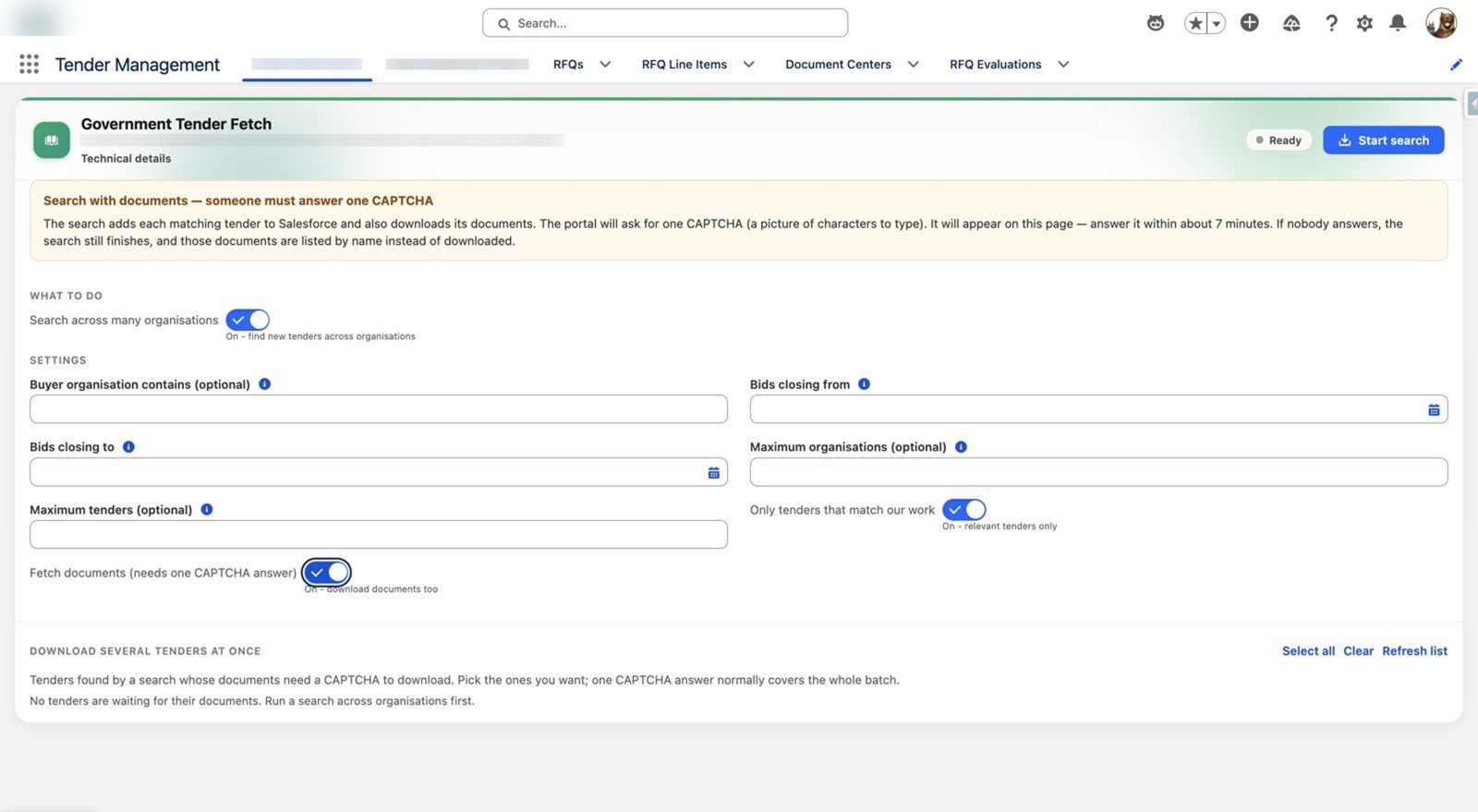
Set the search once
Optional filters for buyer organisation, closing dates and maximum tenders. A relevance switch keeps only work that fits your capabilities.
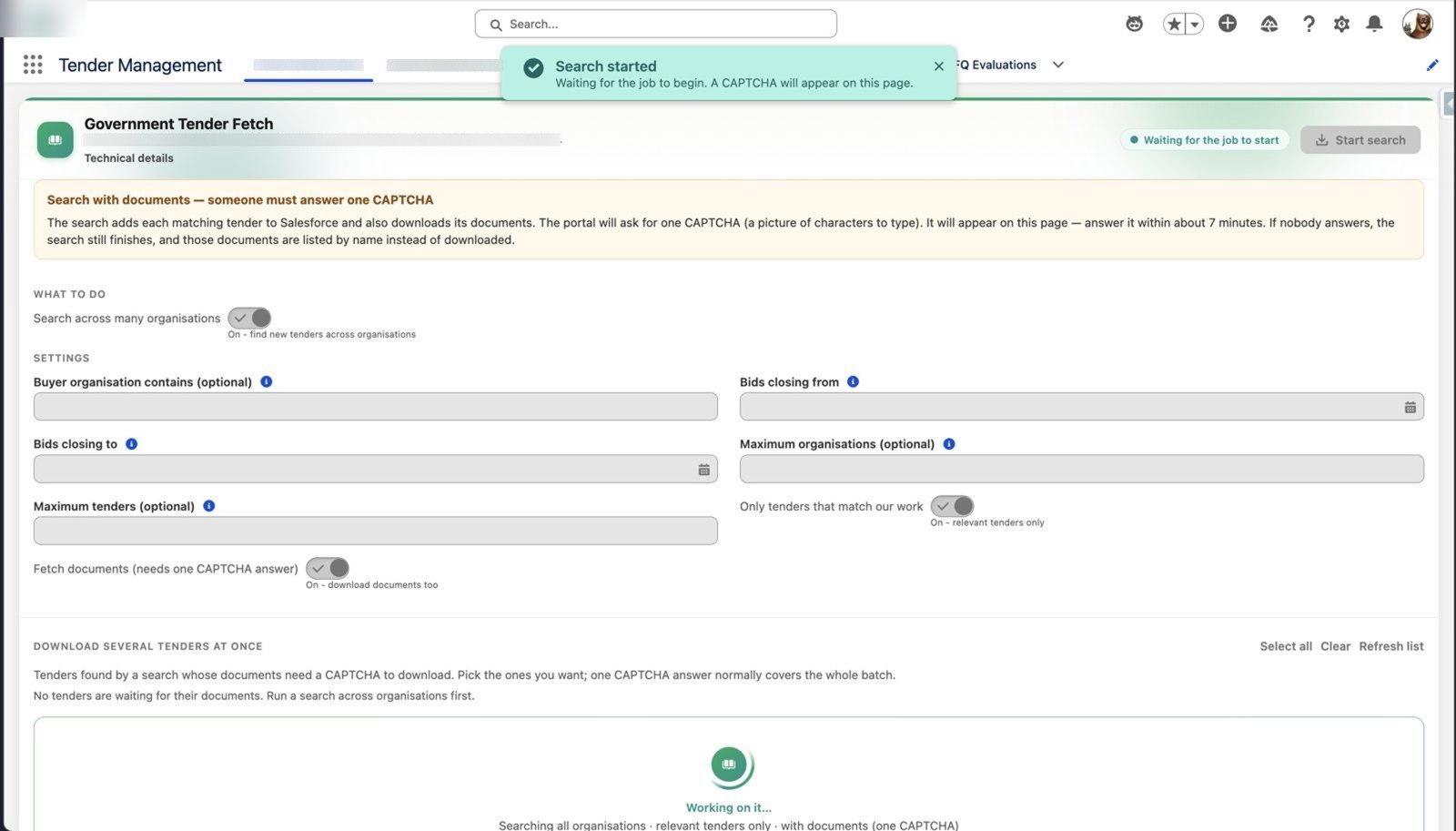
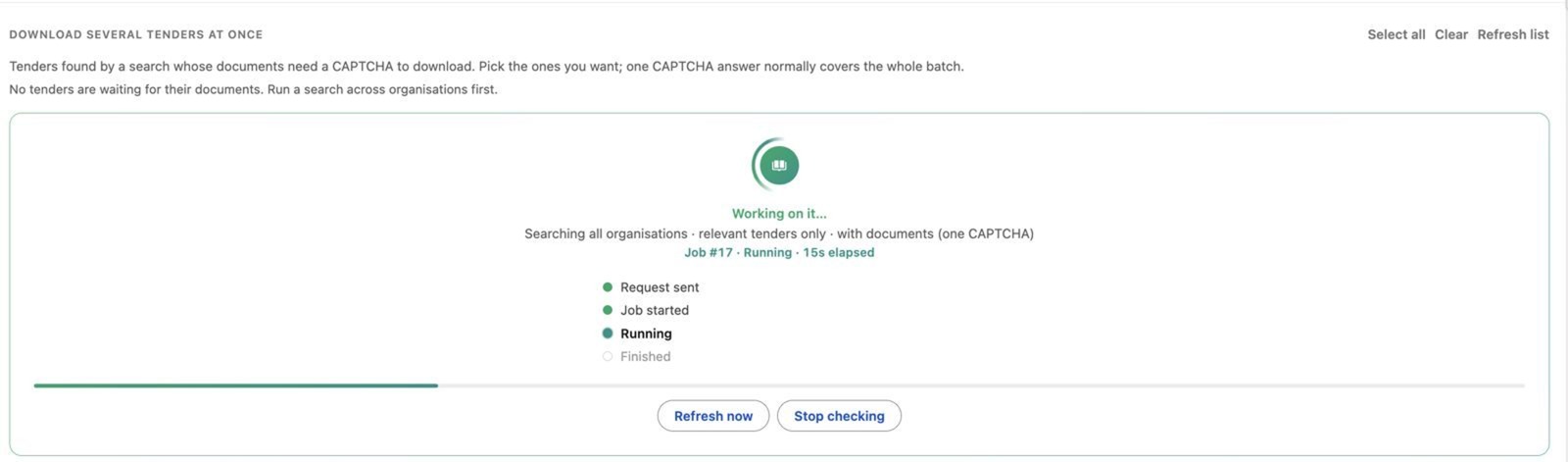
Press start, watch it work
Inputs lock and the job runs with live progress on the same page, with no tab-switching.
Human-assisted portal access
Where a source requires a CAPTCHA or access confirmation, an authorised person completes it. Session limits and document access vary by portal; restrictions are not bypassed.
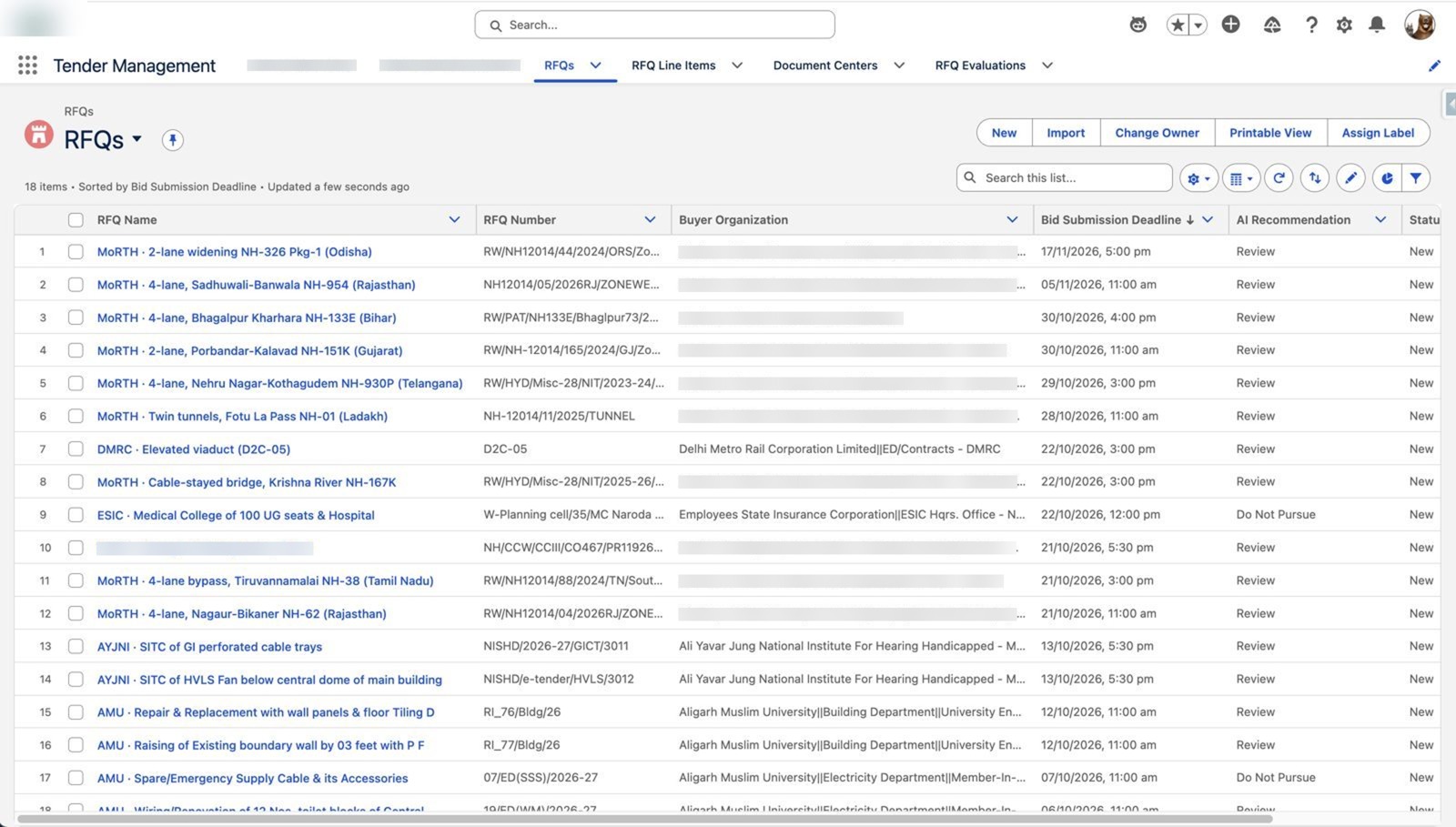
One sorted tender pipeline
Readable names, the buyer, the bid deadline and an AI recommendation on every row, sorted by deadline.
Read
Tender documents are fetched and every page is extracted, so header data, dates and scope are captured on the tender record and anyone can check exactly what the AI read.
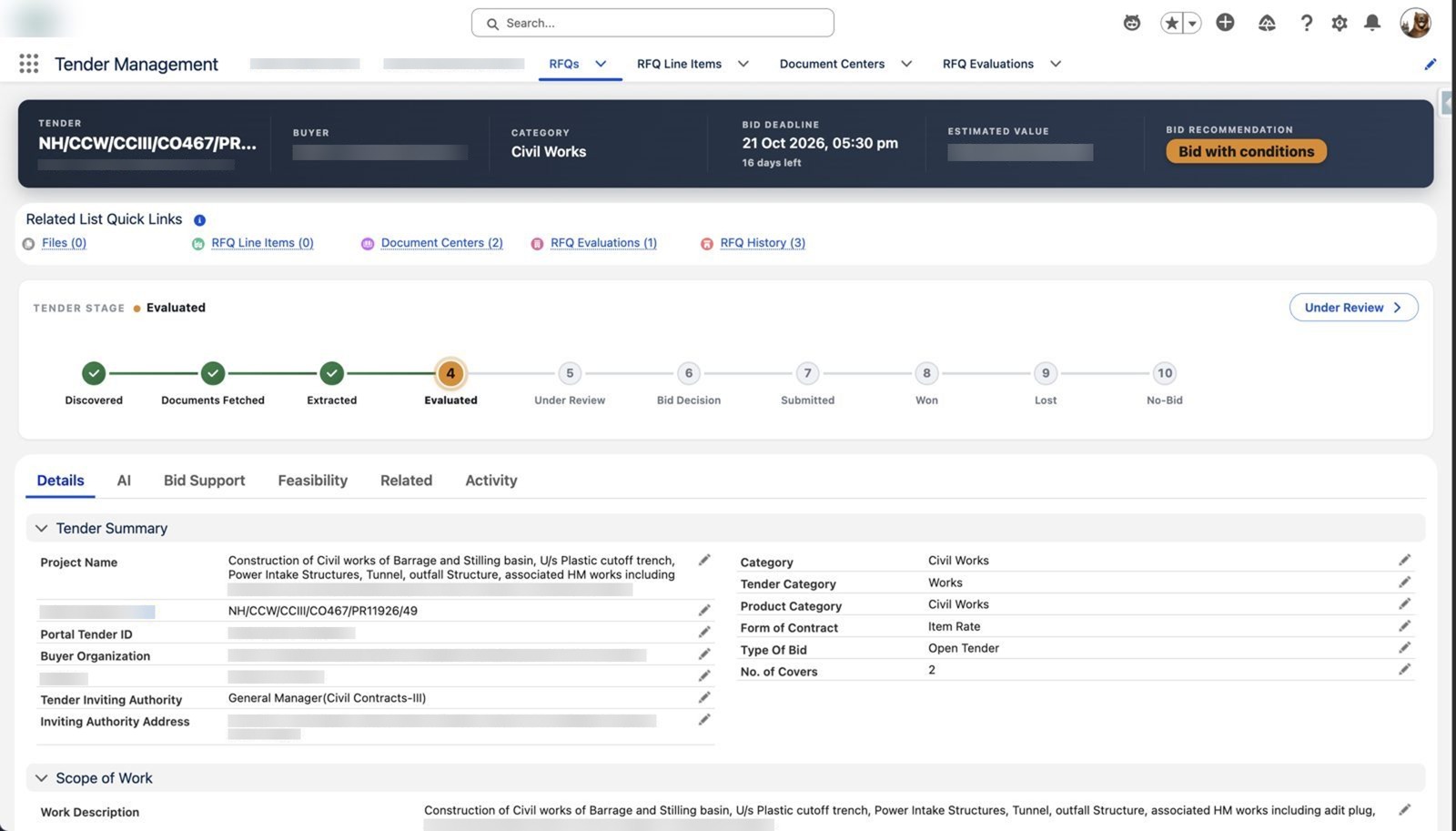
A tender understood at a glance
Estimated value, buyer, category and a 10-stage lifecycle from Discovered to Won, Lost or No-Bid, with portal facts captured.
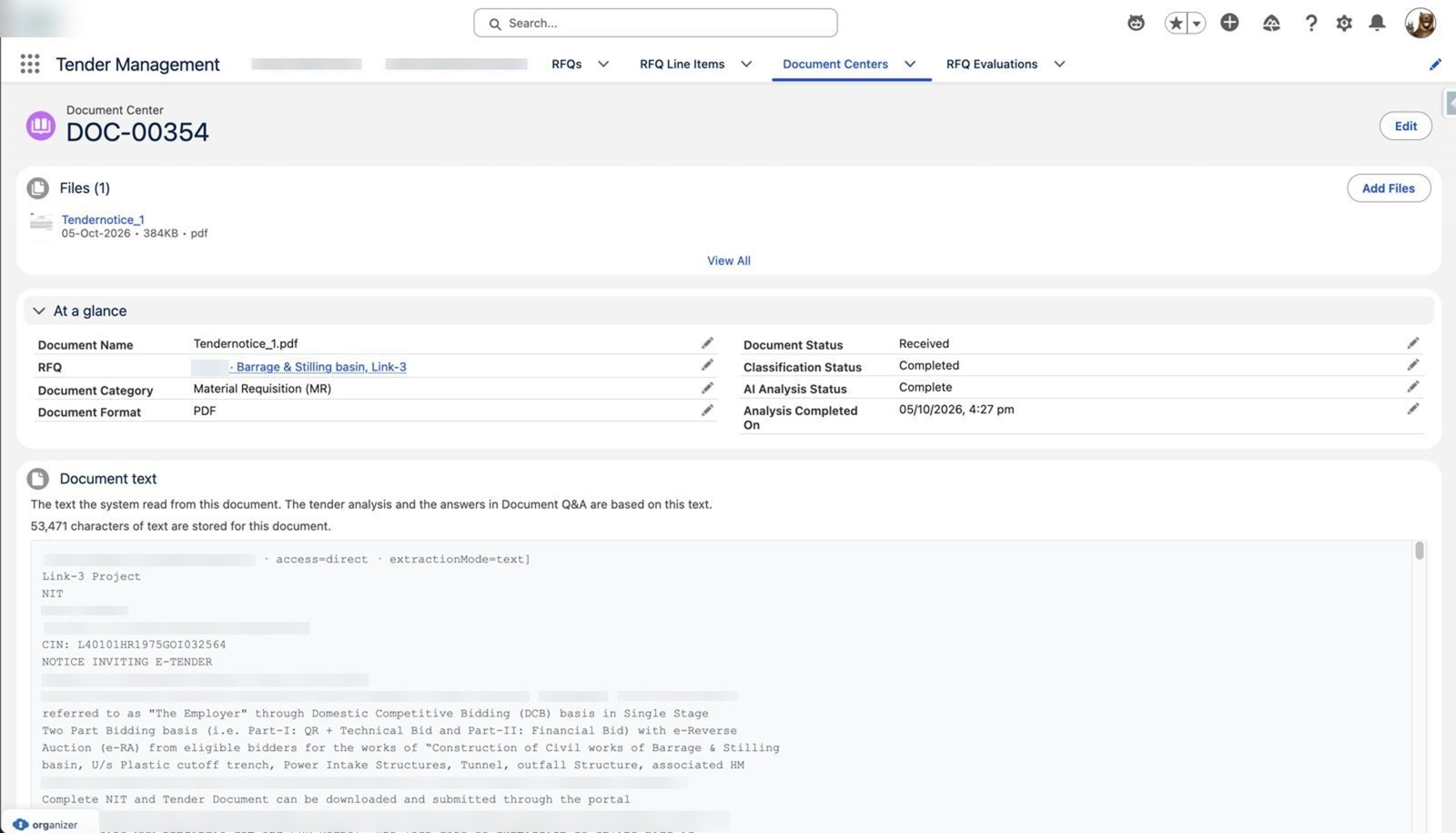
The source document, side by side
The original file and its extracted text sit together, with classification and AI analysis status. Nothing is hidden.
Decide
A bid recommendation computed by fixed rules, explained in plain English, and honest about what the documents did not confirm.
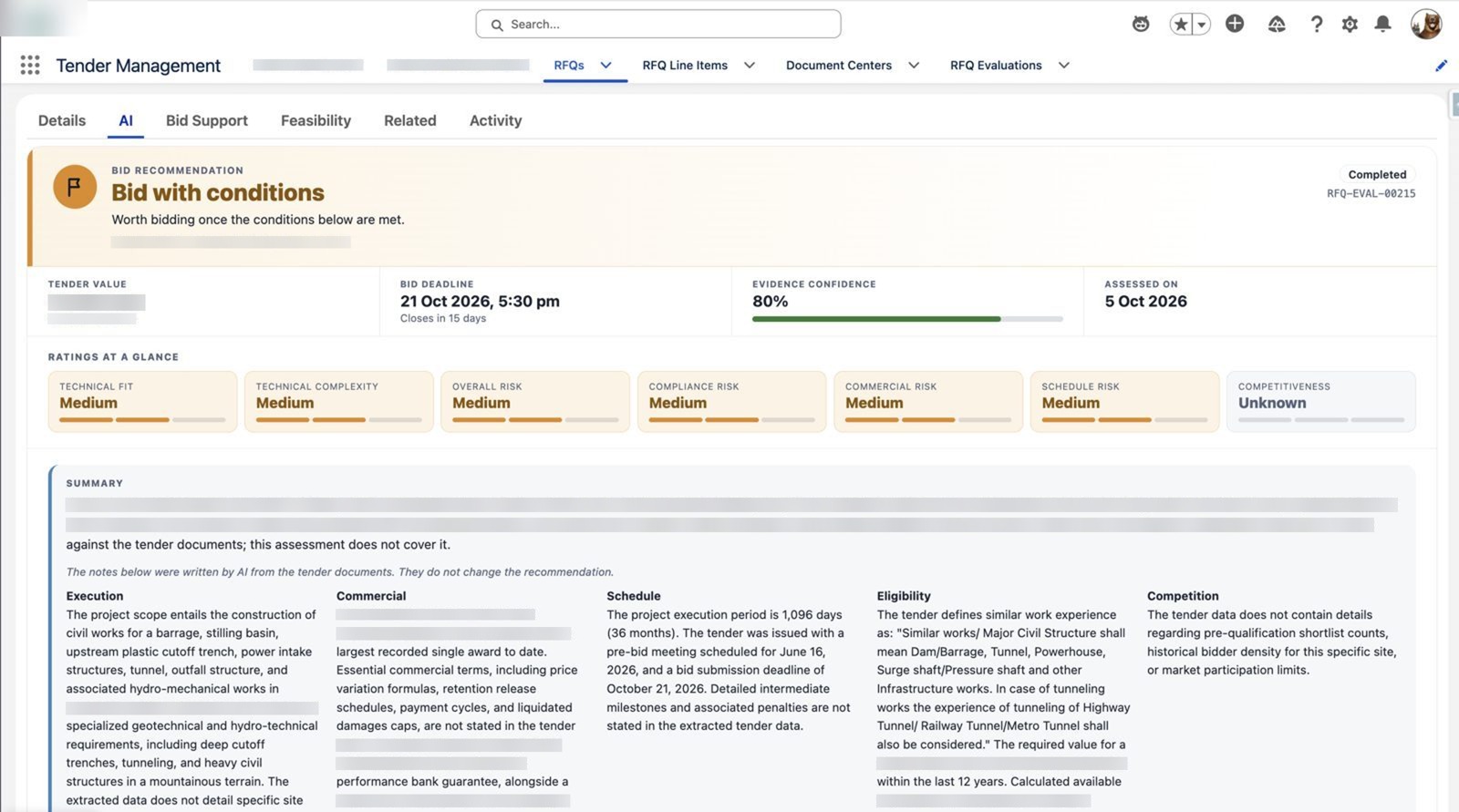
Bid recommendation with reasoning
Verdict, evidence confidence and seven ratings: fit, complexity, four risk areas and competitiveness. Unknown when the documents are silent.
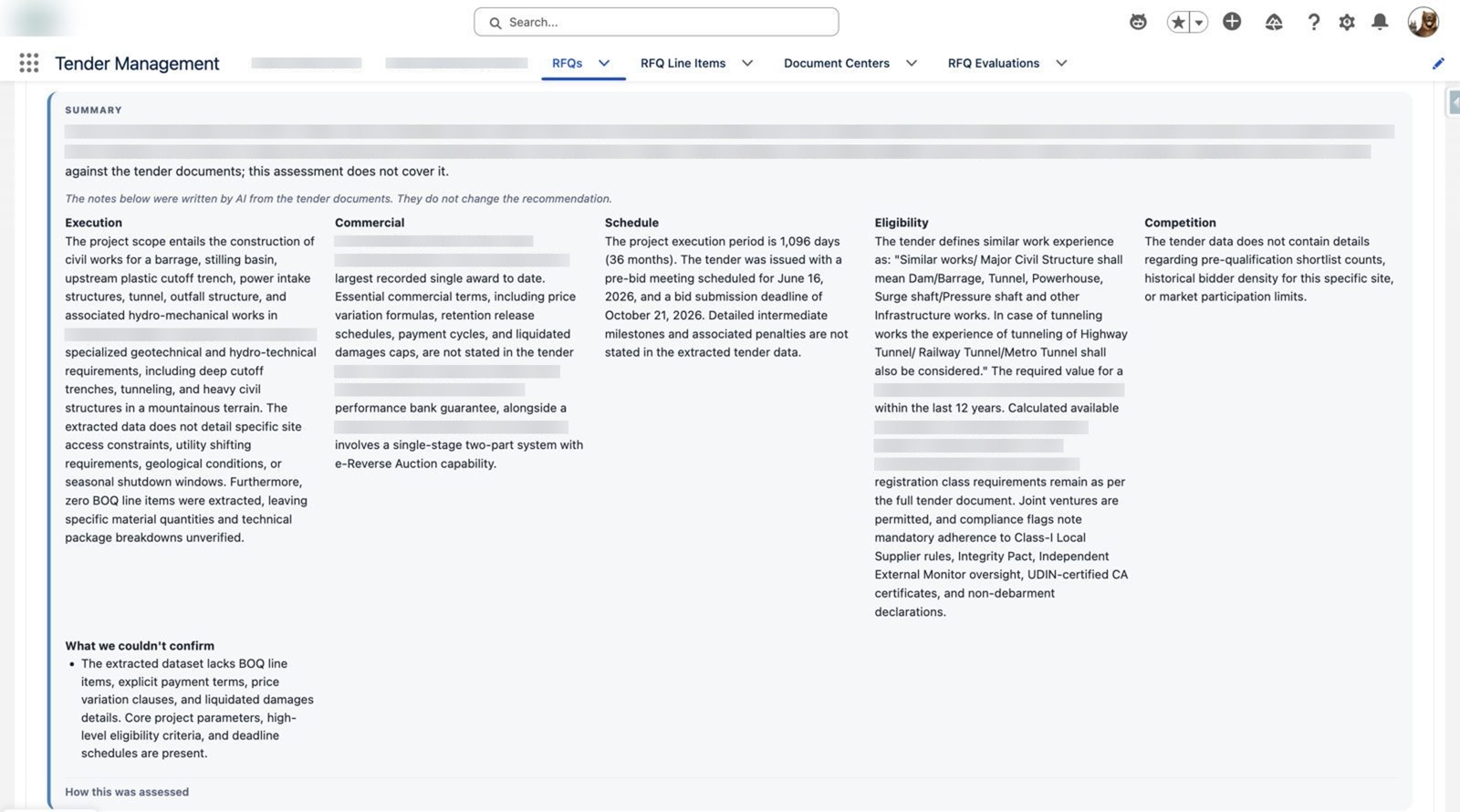
Plain-English analysis that admits gaps
Execution, commercial, schedule, eligibility and competition sections, plus a box listing what could not be confirmed instead of guessing.
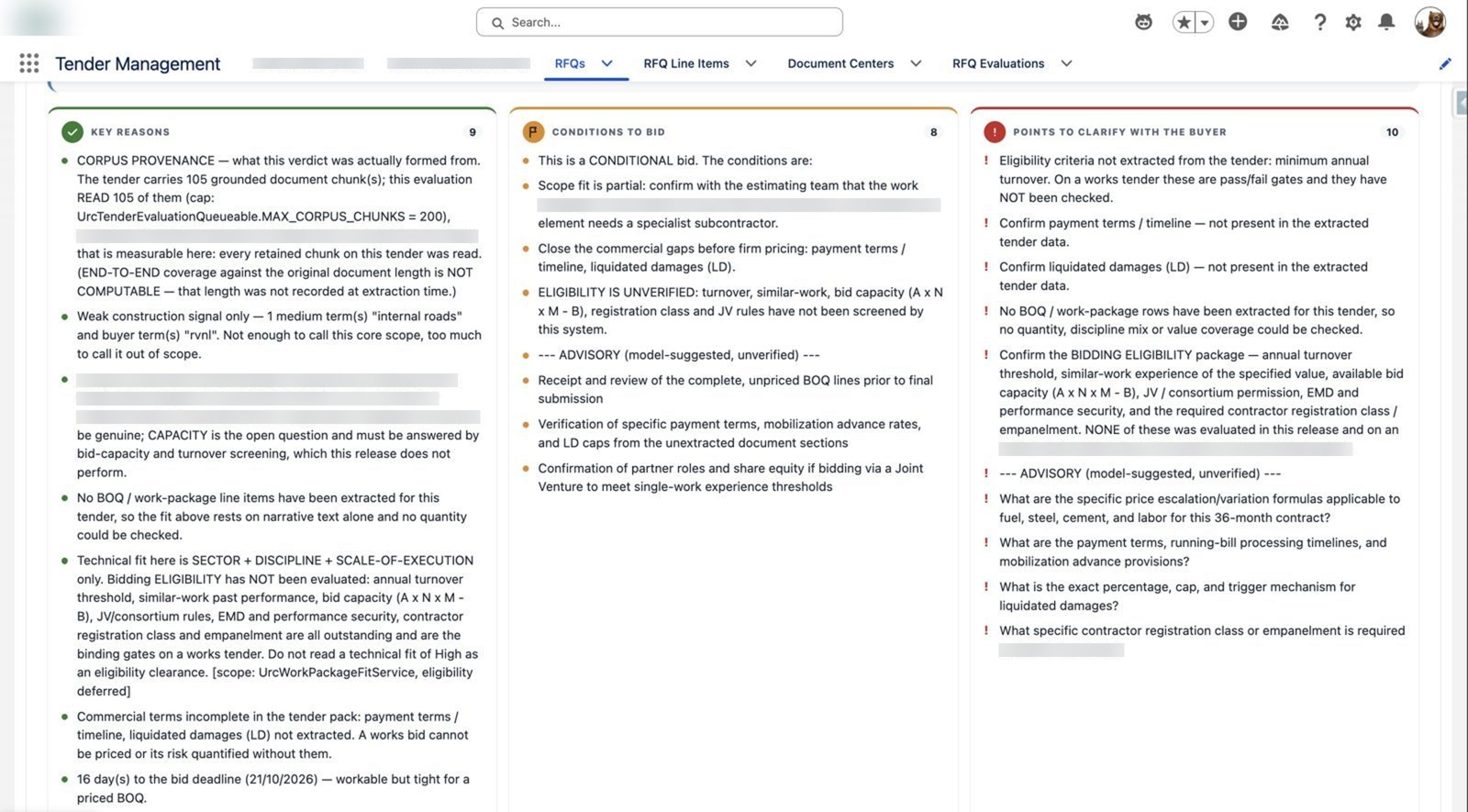
Why, what to fix, what to ask
Key reasons, conditions to bid and questions for the buyer, each traced back to the tender text.
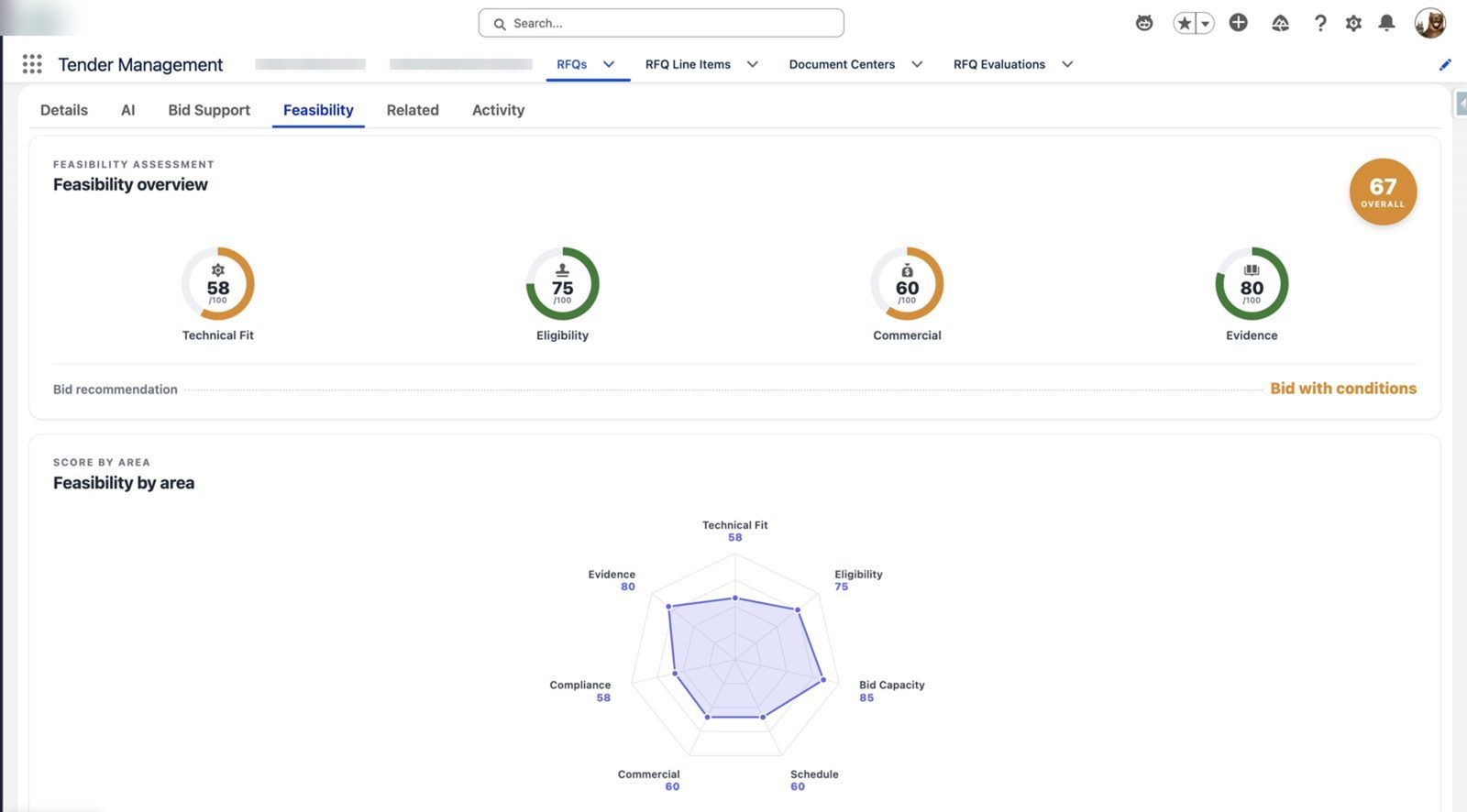
Feasibility scored across seven areas
One overall score, gauges and a radar that shows where the risk sits.
Prepare and act
The decision becomes a dated, owned bid plan on the same record: countdown, key dates and amounts, a readiness checklist and standard Salesforce tasks.
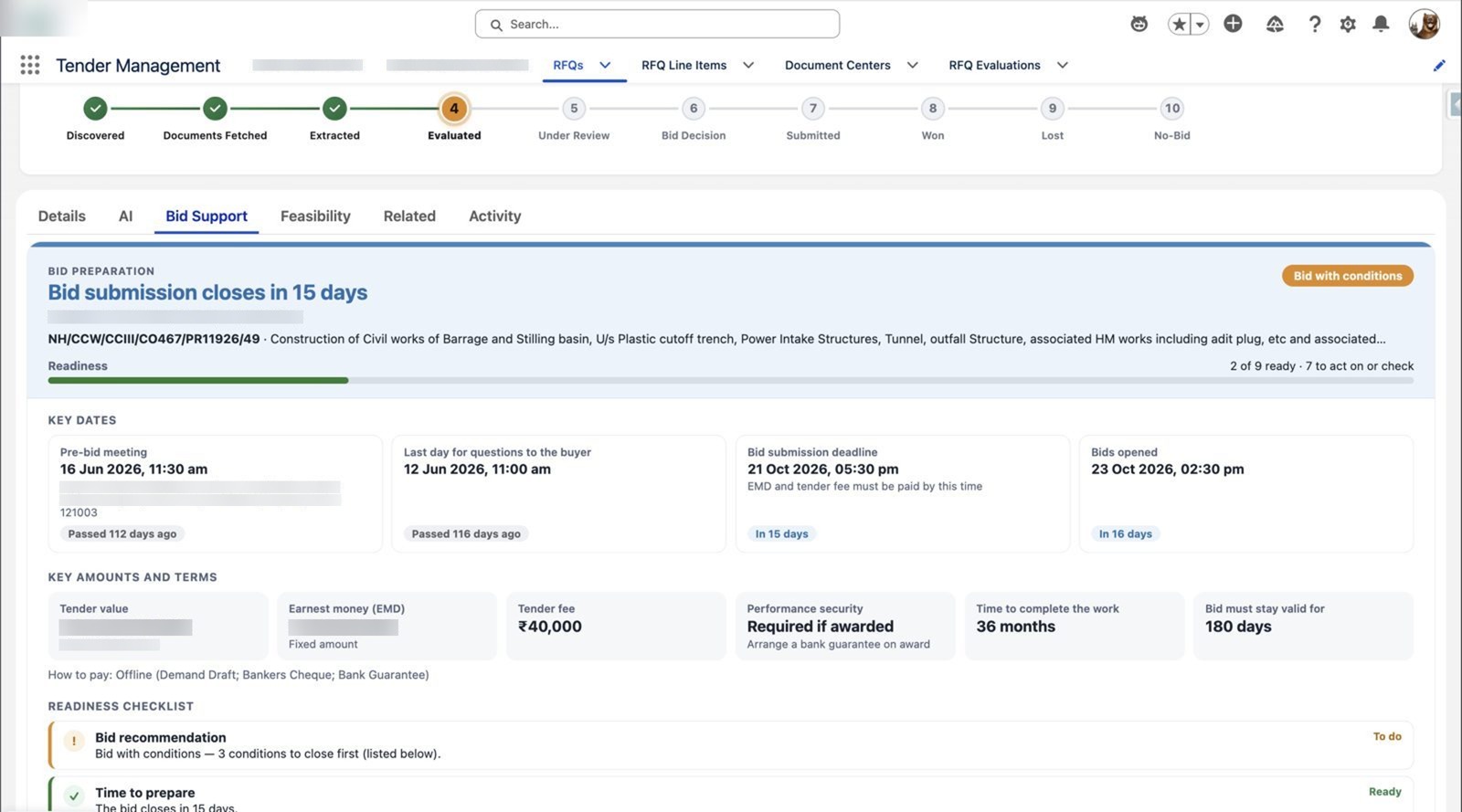
Countdown, dates and money
Bid submission countdown, pre-bid and query dates, tender value, earnest money and bid validity in one panel.
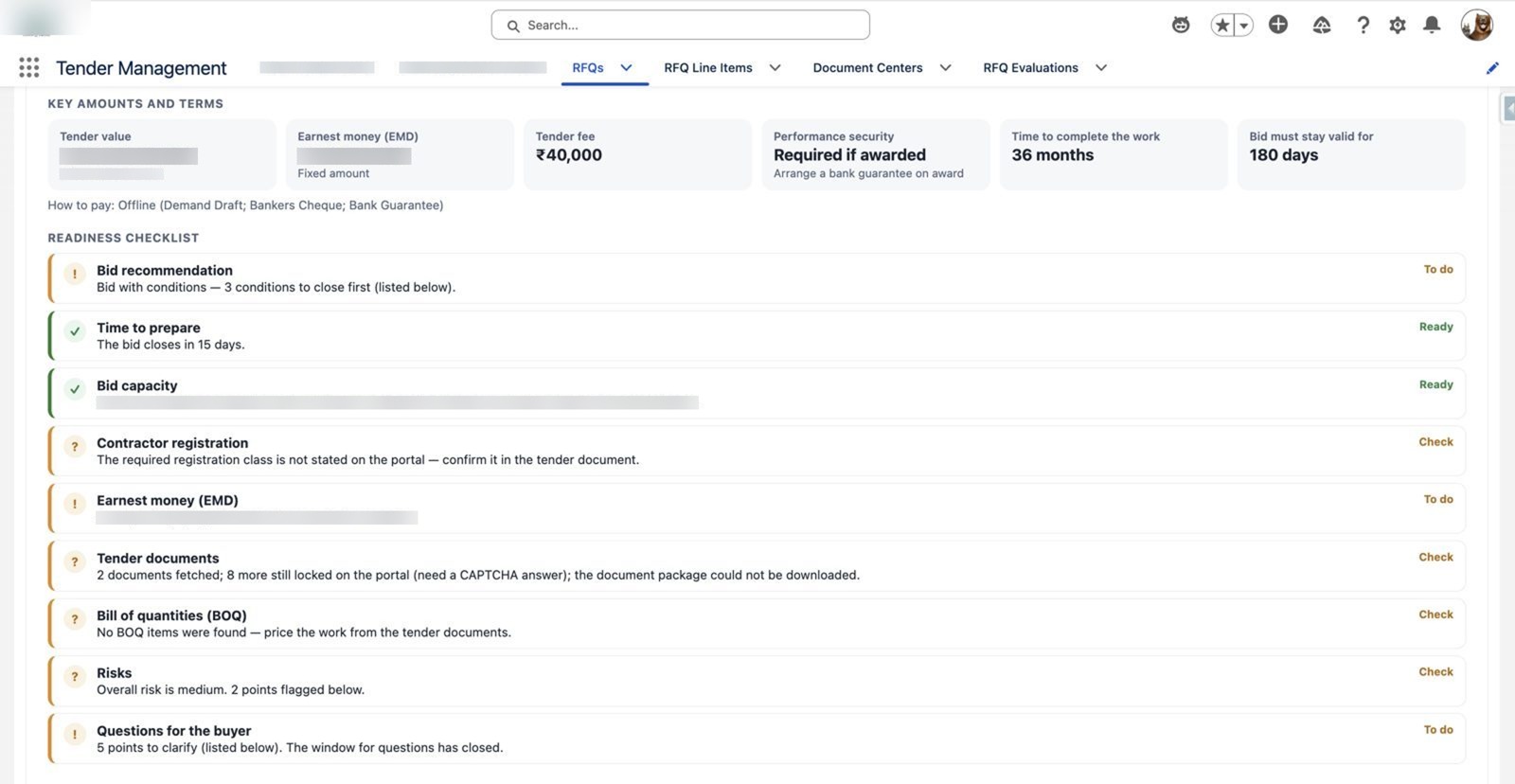
Readiness checklist
Each item marked Ready, To do or Check, with the reason in plain English.
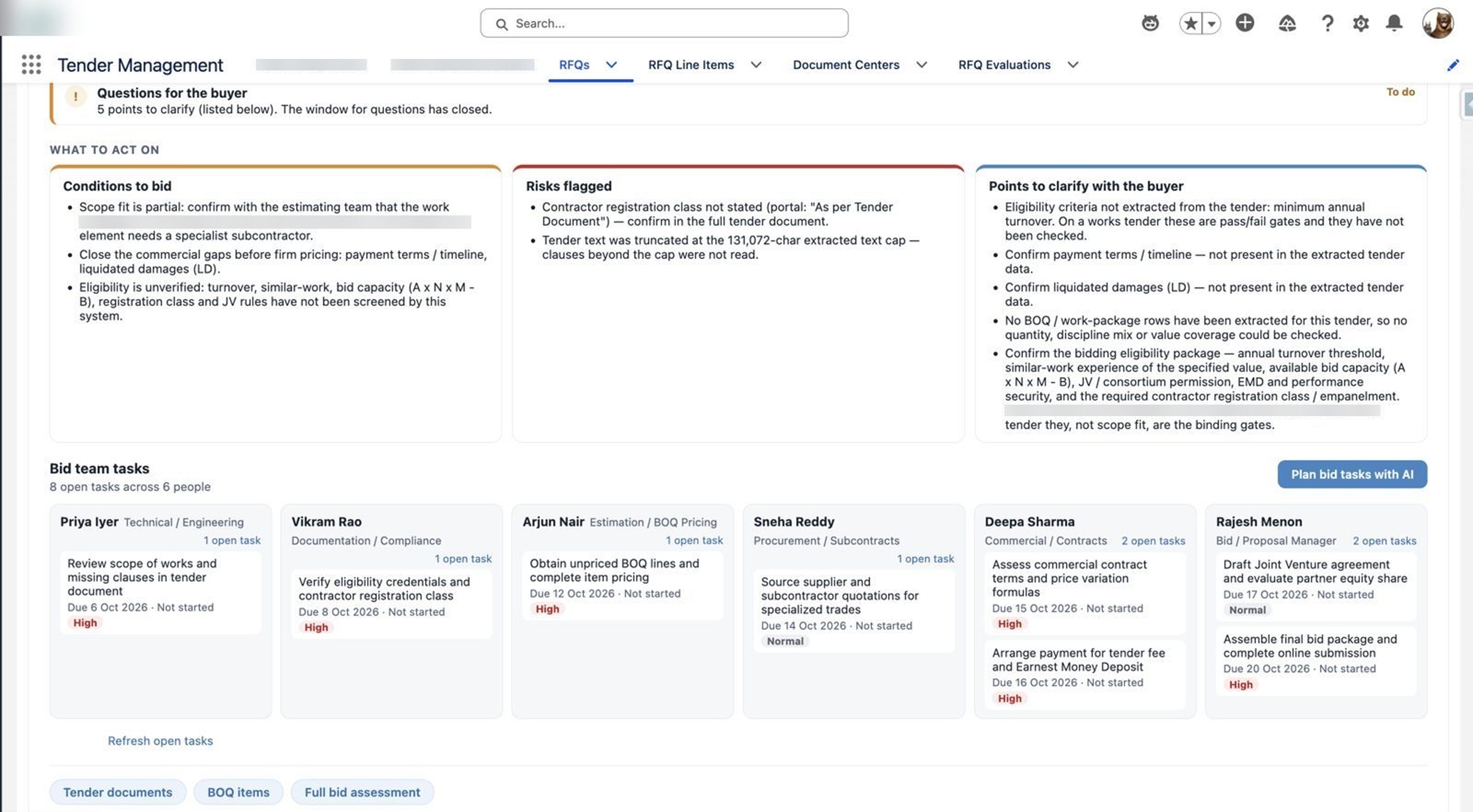
Conditions, risks and bid team tasks
Conditions to bid, flagged risks and owner-assigned tasks for each bid team member.
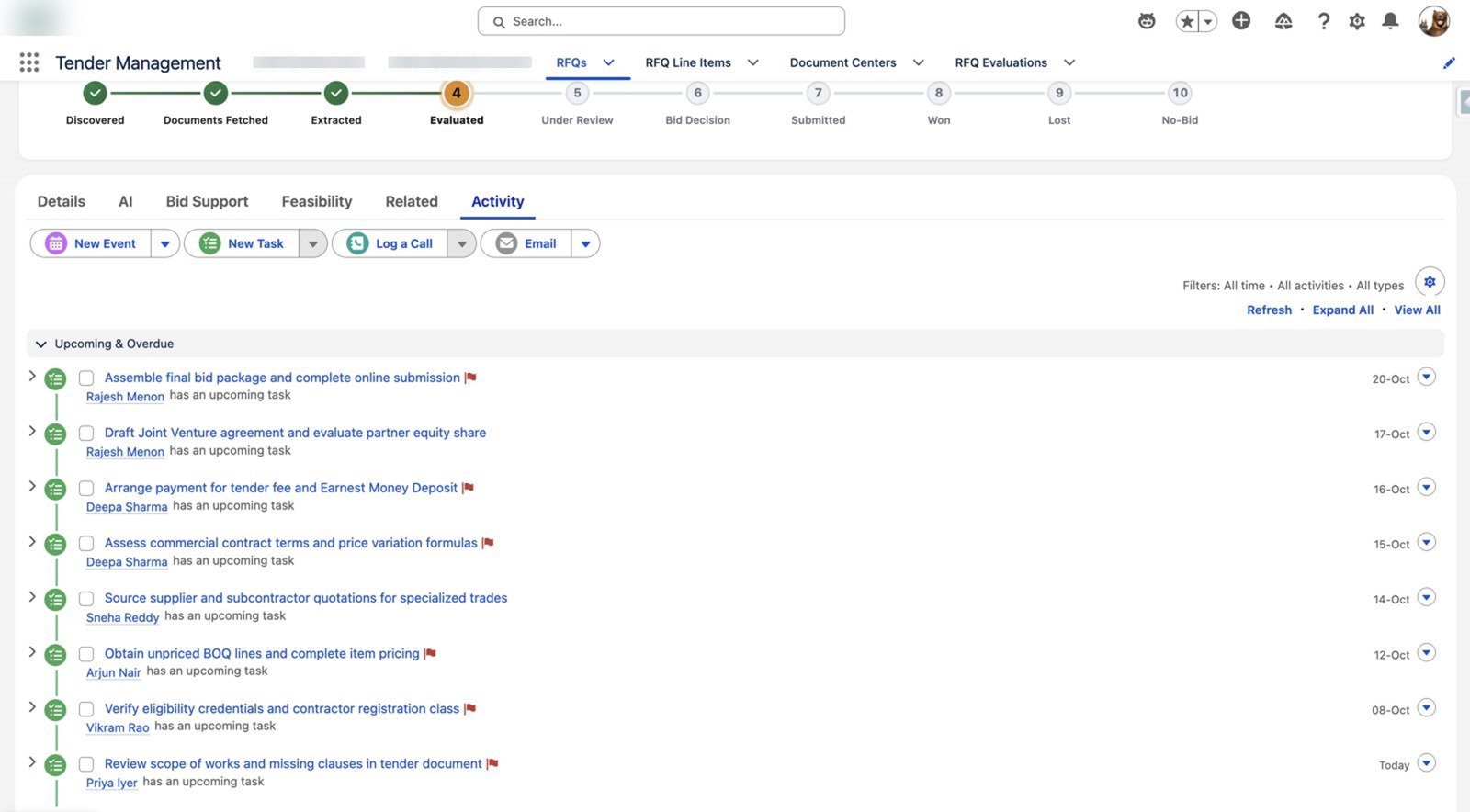
Bid tasks on the timeline
Tasks from scope review to final submission, each dated before the bid deadline.
Intake, assess and collaborate
Drop in any RFP or RFQ and Agentforce reads it, creates the Opportunity, RFQ and line items, scores weighted feasibility and runs every department on one bid board.
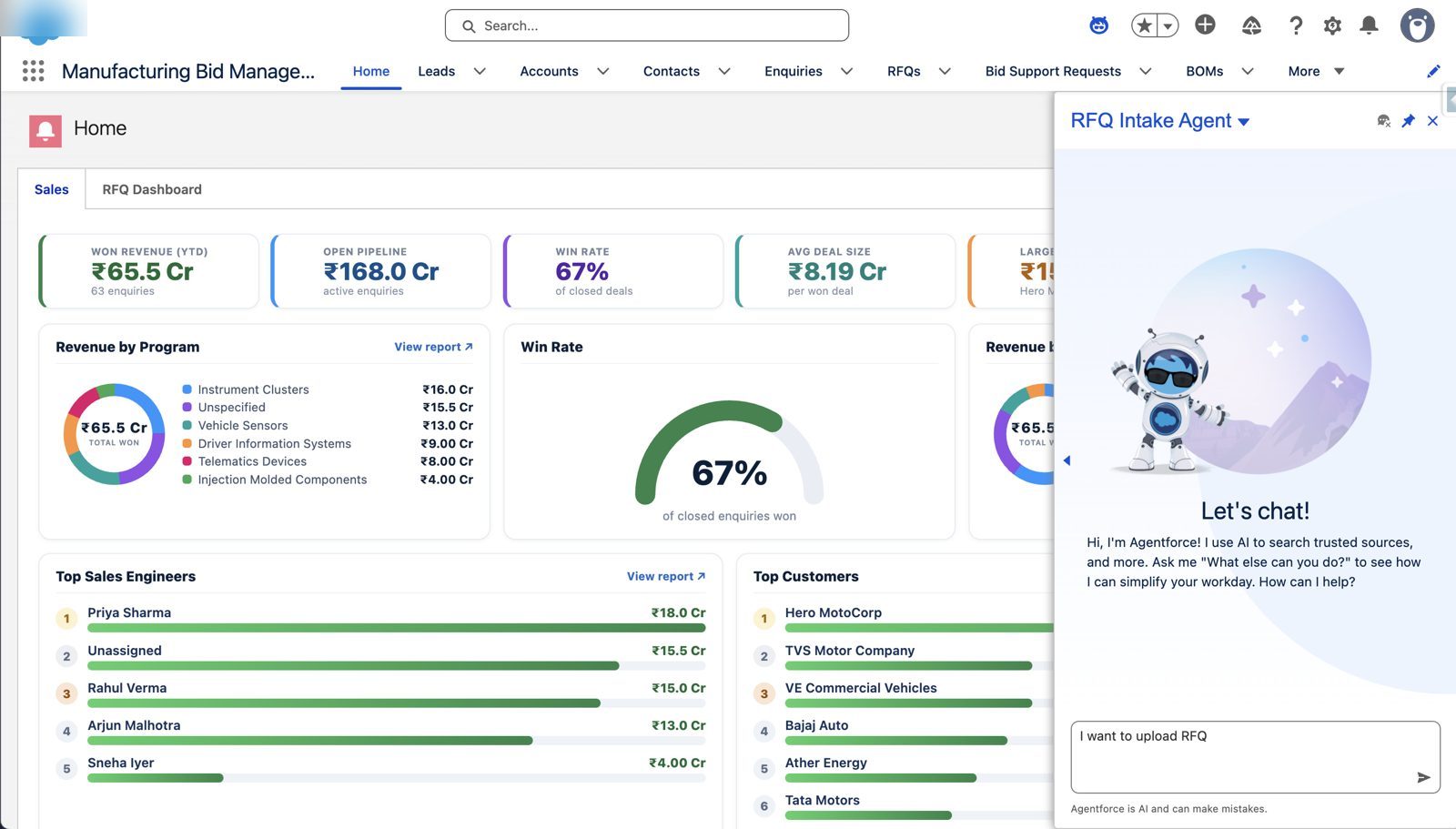
RFQ Intake Agent inside Salesforce
Start from the sales home page or Agentforce chat: “I want to upload an RFQ.”
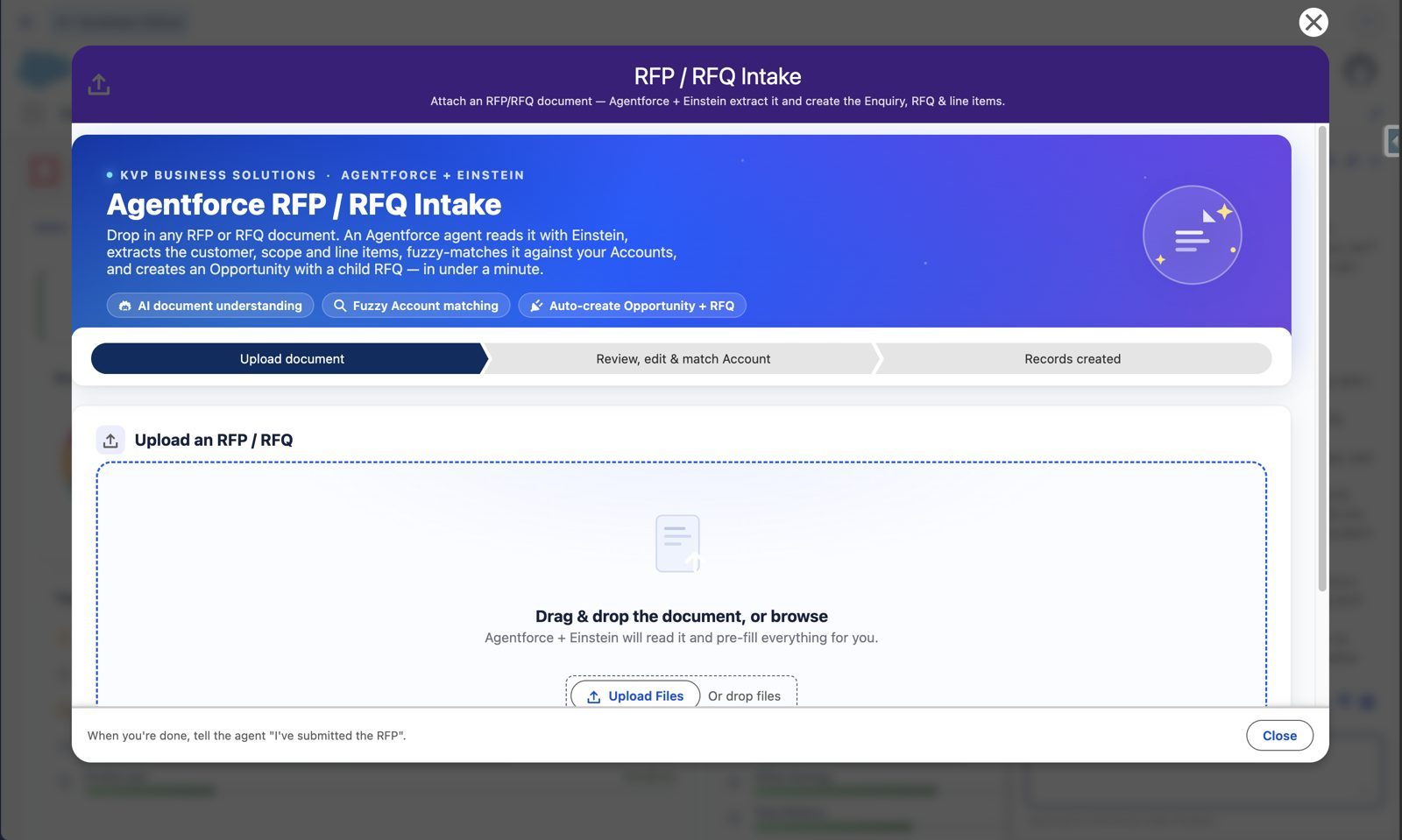
Drop in an RFP
Upload a document; Agentforce and Einstein extract customer, dates, contact and scope.
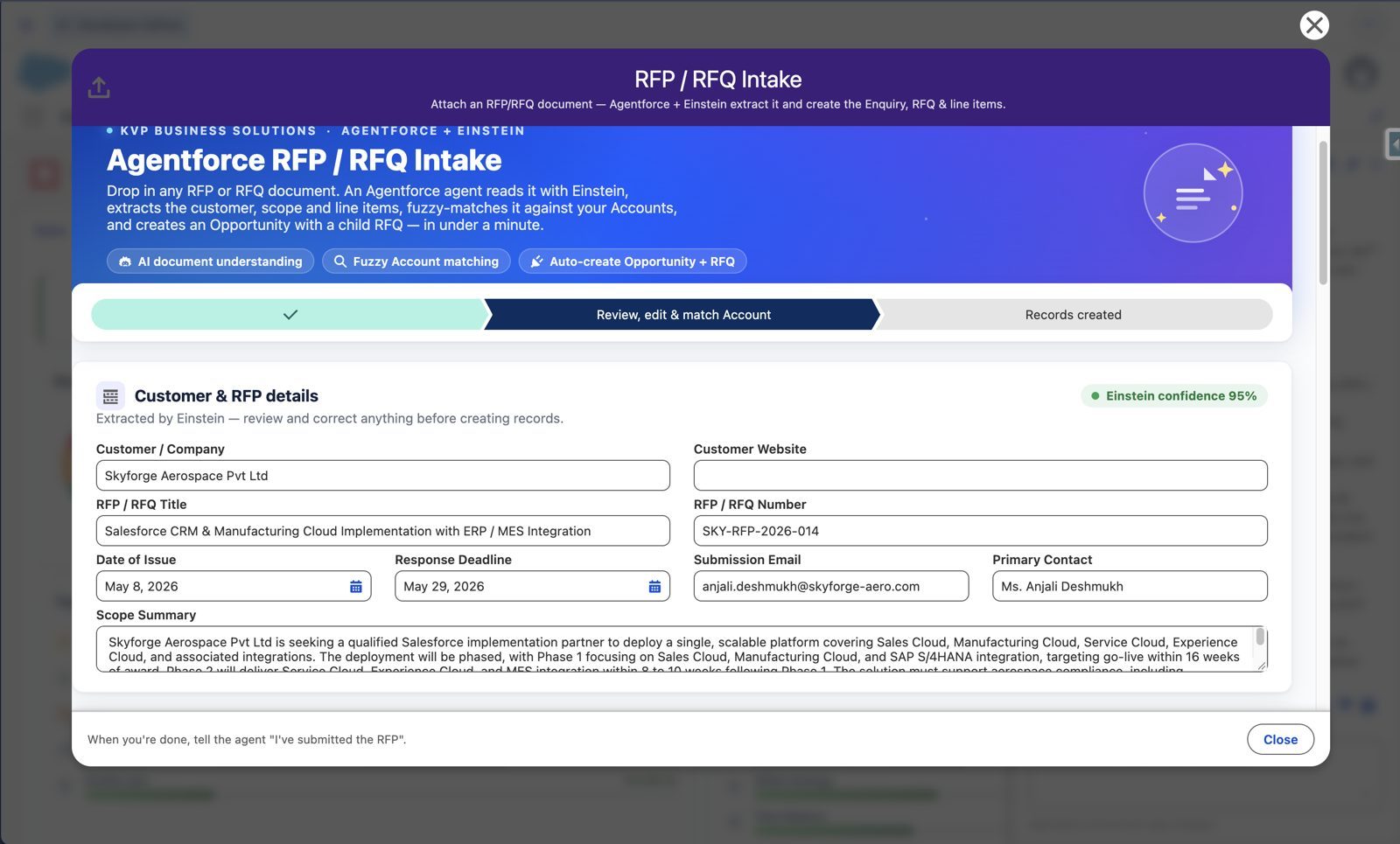
Human in the loop
Every extracted field can be reviewed and corrected, and the Account fuzzy-matched, before records are created.
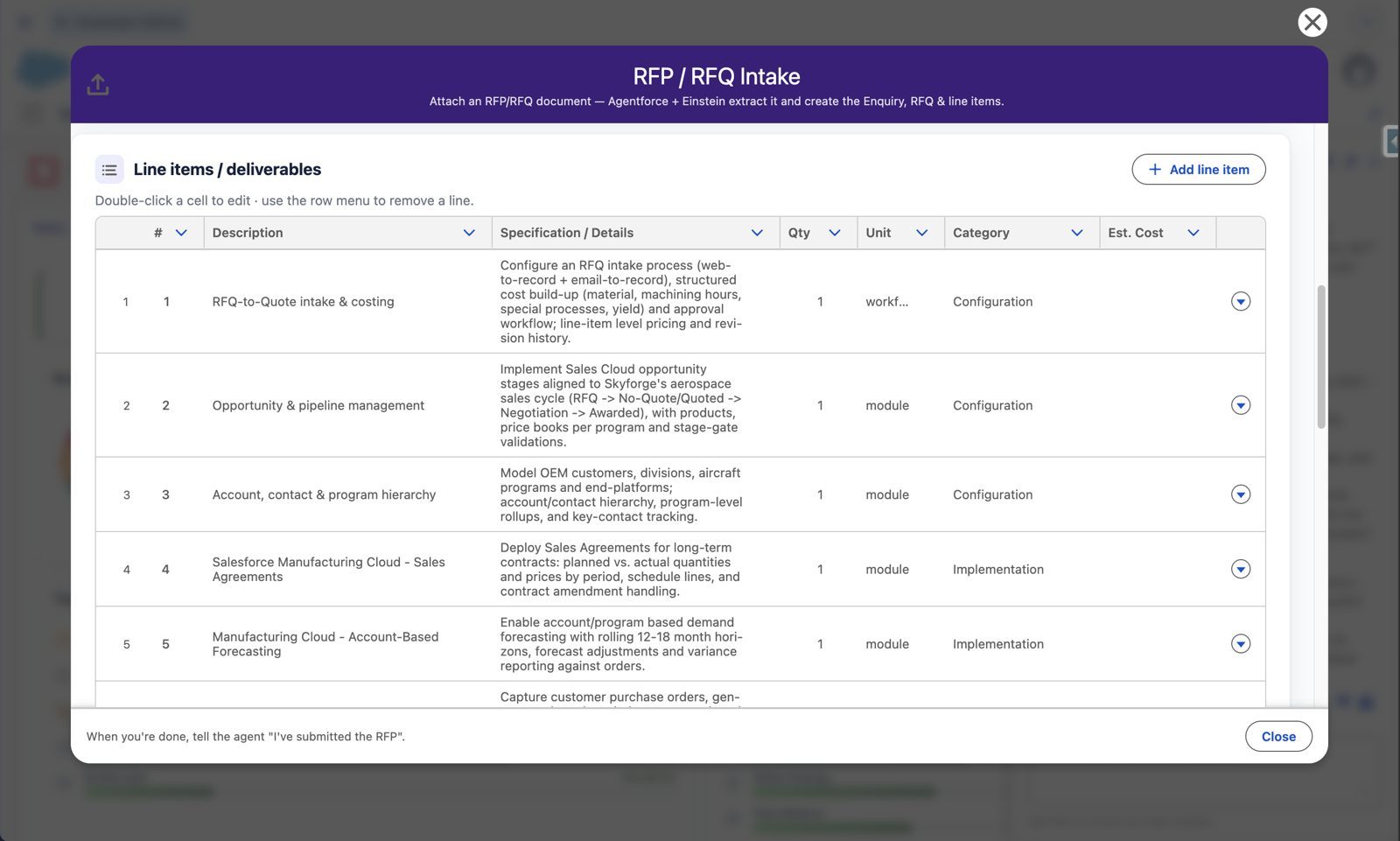
Line items, ready to edit
Each deliverable becomes an editable line item; add anything that was missed.
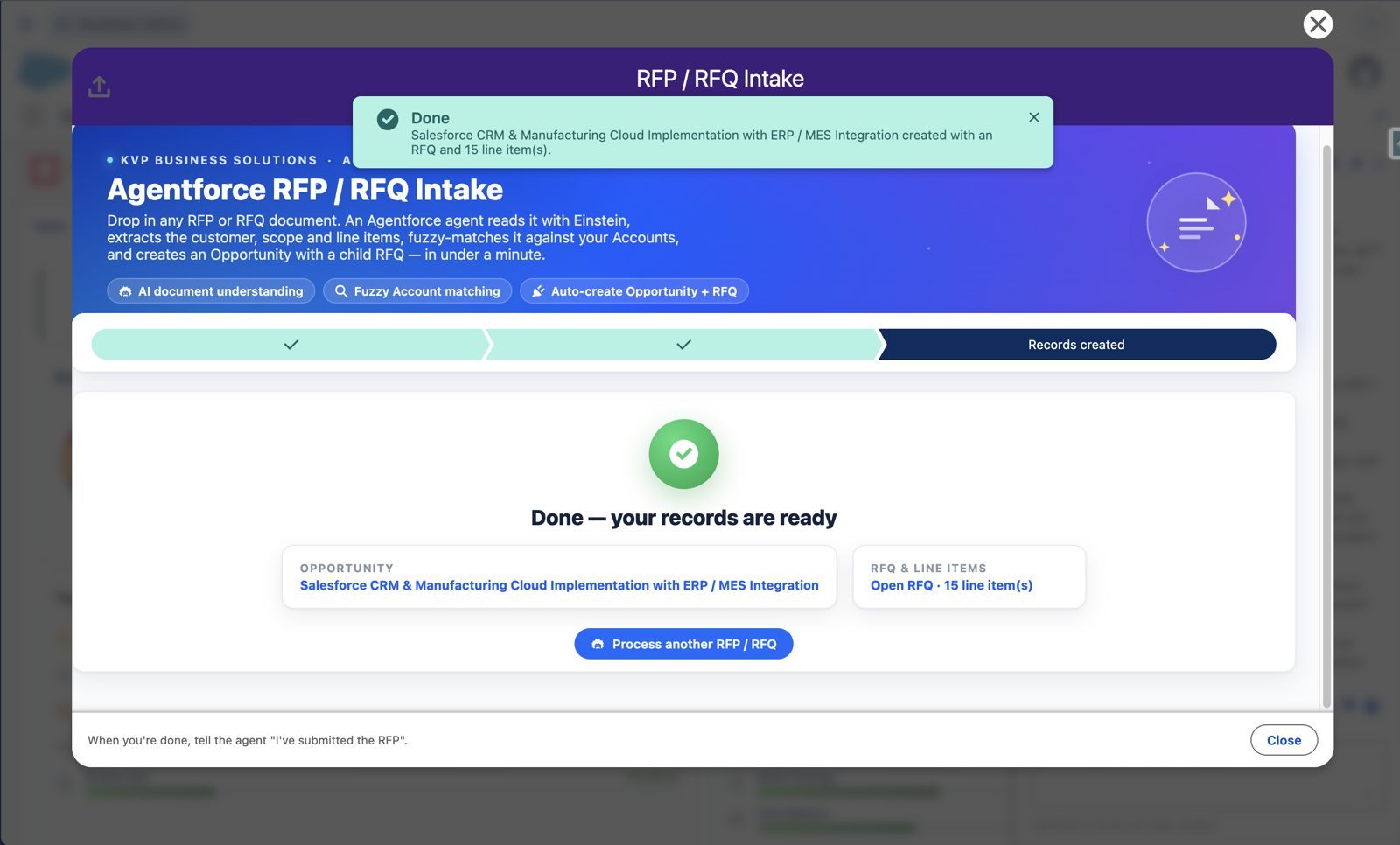
One confirmation, records exist
Opportunity, RFQ and line items created together and linked to the right Account.
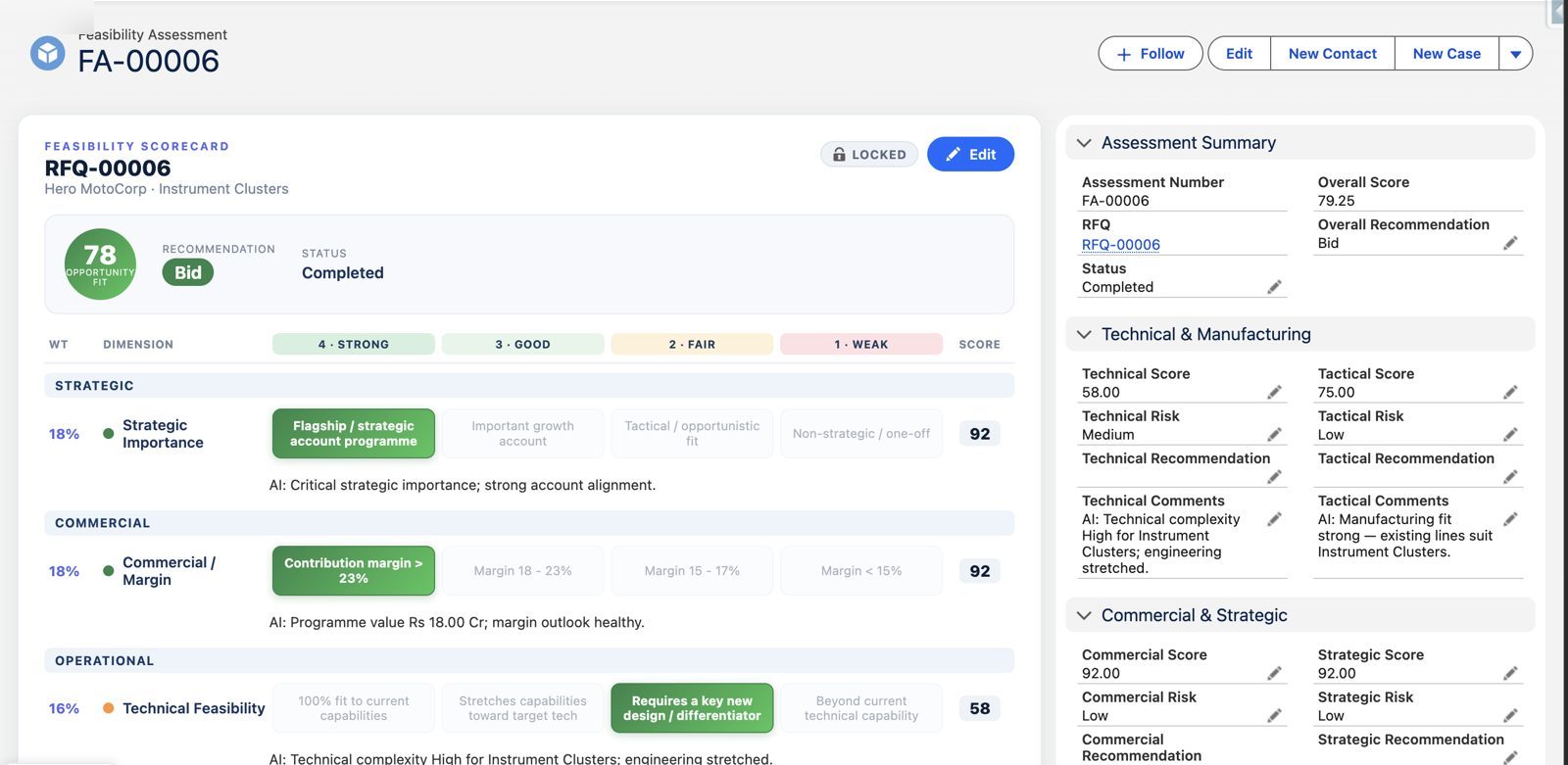
Weighted feasibility scorecard
Strategic, commercial and operational dimensions, each weighted and rated with an AI comment.
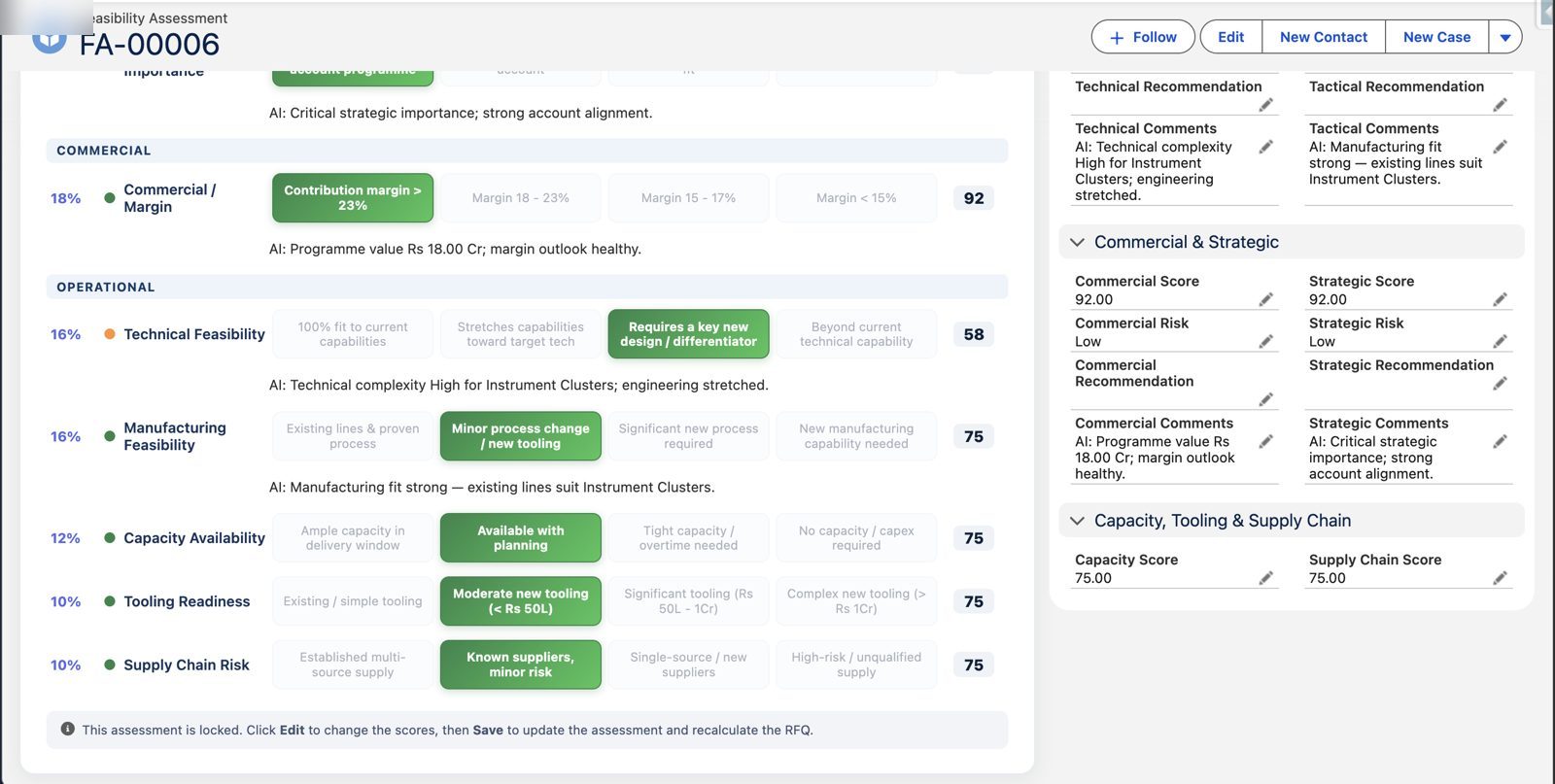
Operational readiness
Manufacturing feasibility, capacity, tooling and supply-chain risk scored like every other dimension.
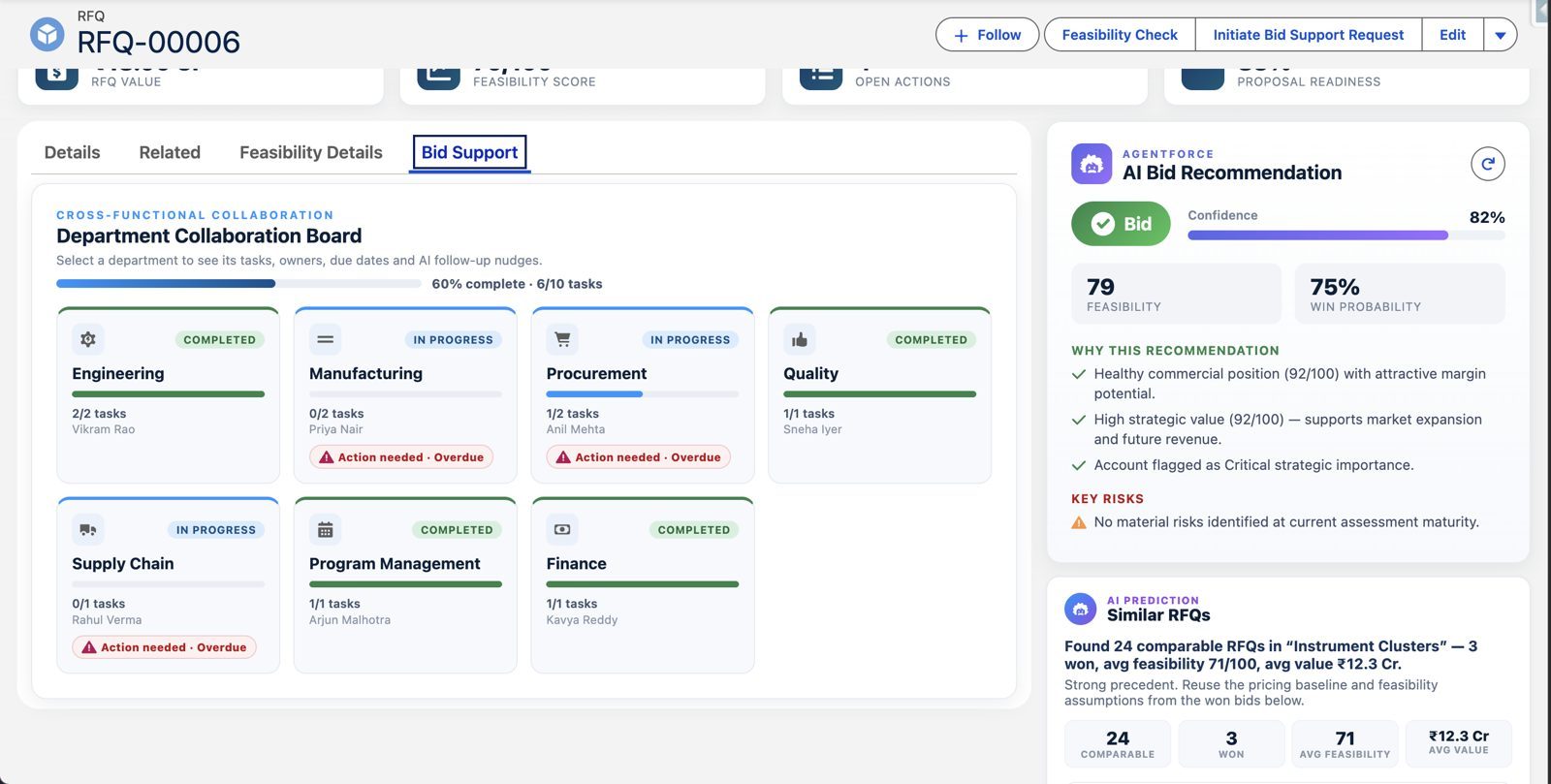
Every department on one bid board
Engineering, manufacturing, procurement, quality, finance and more, beside an AI bid recommendation and similar past RFQs.
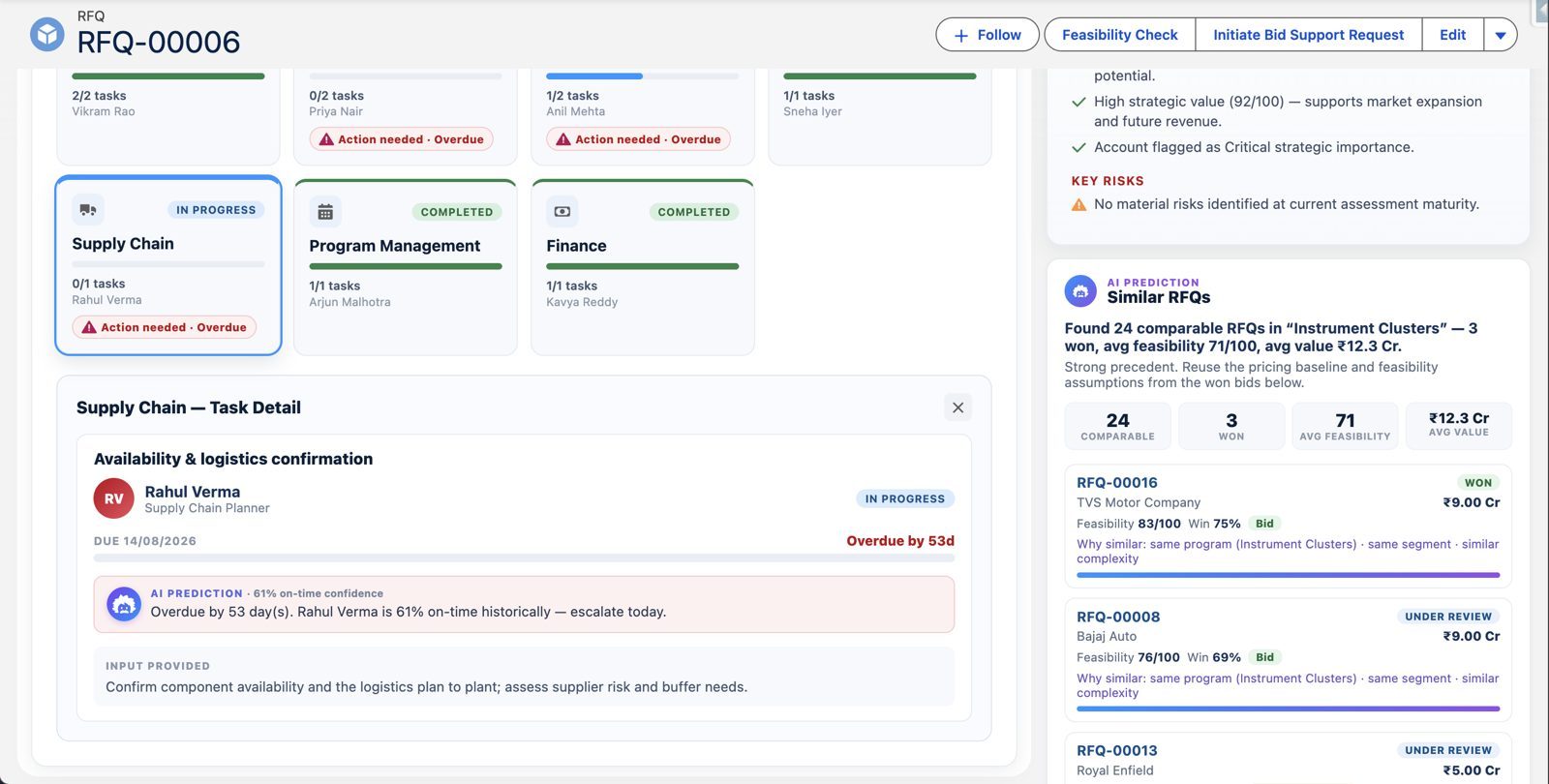
AI follow-up nudges
Open a department to see its task, owner and due date with a suggested follow-up.
Business benefits
No more manual portal browsing: relevant government tenders arrive in Salesforce automatically
Faster, consistent bid/no-bid decisions with reasons and gaps shown, not hidden
Opportunities, RFQs and line items created in one flow from any tender or RFP document
Every deadline, checklist item and bid task owned and dated on one record
Cross-department collaboration on one board instead of email and spreadsheets
A full audit trail: source document, extracted text, verdict and work in one place
Ways to extend it
- Private-sector RFQ intake through the same Agentforce flow
- Proposal and compliance-document drafting from the tender record
- An Agentforce assistant for bid managers whose answers point back to the source document
Frequently asked questions
What is the Agentforce Government Tender Intelligence asset?
A pre-built KVP Salesforce asset that finds relevant government tenders, reads documents, creates Salesforce opportunities, gives an explained bid/no-bid recommendation and supports proposal preparation. Additional portal coverage requires validated integrations and permitted access; universal coverage is not claimed.
Which portals does it work with?
The existing build demonstrates procurement-portal discovery. Each additional national, regional or sector portal needs separately validated access, category coverage and integration scoping.
Does the AI decide whether to bid?
No. The recommendation is computed by fixed rules and explained with reasons, conditions, buyer questions and items it could not confirm. Bid managers make the final decision.
Who is it for?
Manufacturers, EPC contractors, engineering and infrastructure firms that bid for public-sector and private RFQs and already use, or plan to use, Salesforce Sales Cloud.
How are CAPTCHAs handled?
An authorised person completes any CAPTCHA or access confirmation required by the source. Session limits and download permissions vary by portal. The intake design must respect those controls and flag inaccessible documents for manual review.
How do procurement marketplaces differ from tender publication portals?
Procurement marketplaces may support catalogue purchasing and bidding for goods and services. Tender publication and e-procurement portals publish notices, documents, amendments and award information. Workflows vary by buyer and jurisdiction: suppliers must follow the authoritative notice and the applicable procurement rules.
Is every procurement portal supported out of the box?
No. The existing build demonstrates discovery on a scoped procurement source. KVP checks permitted access, authentication, document availability, languages and the buyer's workflow before committing to additional portal coverage.
Can I use the same Salesforce tender pipeline for multiple procurement sources?
Yes, the record model can be configured to retain the source portal, tender identifier, buyer, deadline and source documents in one Salesforce pipeline. Each portal still needs its own validated intake method. Duplicate checks and source links are important so that repeated notices do not become duplicate opportunities.
Does Agentforce submit government bids automatically?
No automatic portal submission is claimed for this asset. It supports discovery, document analysis, opportunity creation, bid planning and proposal preparation. Authorised people approve pricing, declarations and the final submission, following the relevant portal's rules.
How does AI bid/no-bid analysis help manufacturing companies?
It makes product fit, eligibility, delivery constraints, commercial risk and operational readiness visible before a team commits to a bid. Engineering, manufacturing, procurement, quality and finance can review the evidence together. A positive AI recommendation is not a guarantee of eligibility or a tender award.
What is needed to implement tender management in Salesforce?
Start with a Salesforce environment, an agreed opportunity and RFQ model, authorised portal access, document handling rules, eligibility criteria, scoring weights and named reviewers. Agentforce licensing, consumption costs and any integration services are confirmed during scoping. A pilot should test extraction accuracy, missing information, access controls and bid preparation on representative documents.
Can this asset guarantee a government tender win?
No. Tender awards depend on the buyer's evaluation, eligibility, pricing, competition and compliance. The asset supports a more organised, evidence-led bid process; an award or win-rate improvement should only be reported after it has been verified.
See it running on a live tender
Pick one tender and we will show it found, read, scored and planned inside Salesforce.